

MD-100 Training & Certification Get Latest Windows 10 Updated on Oct 05, 2021
Certification Training for MD-100 Exam Dumps Test Engine
NEW QUESTION 129
You have a computer that runs Windows 10 and contains the folders shown in the following table.
You create the groups shown in the following table.
On FolderA, you remove permission inheritance. To each folder, you assign the NTFS permissions shown in the following table.
For each of the following statements, select Yes if the statement is true. Otherwise, select No.
NOTE: Each correct selection is worth one point.
Answer:
Explanation:
NEW QUESTION 130
Note: This question is part of a series of questions that present the same scenario. Each question in the series contains a unique solution that might meet the stated goals. Some question sets might have more than one correct solution, while others might not have a correct solution.
After you answer a question in this section, you will NOT be able to return to it. As a result, these questions will not appear in the review screen.
Your network contains an Active Directory domain. The domain contains a computer named Computer1 that runs Windows 8.1.
Computer1 has apps that are compatible with Windows 10.
You need to perform a Windows 10 in-place upgrade on Computer1.
Solution: You copy the Windows 10 installation media to a Microsoft Deployment Toolkit (MDT) deployment share. You create a task sequence, and then you run the MDT deployment wizard on Computer1.
Does this meet the goal?
- A. No
- B. Yes
Answer: B
Explanation:
Reference:
https://docs.microsoft.com/en-us/windows/deployment/deploy-windows-mdt/upgrade-to-windows-10-with-the-microsoft-deployment-toolkit
NEW QUESTION 131
Your company has an isolated network used for testing. The network contains 20 computers that run Windows 10. The computers are in a workgroup. During testing, the computers must remain in the workgroup.
You discover that none of the computers are activated.
You need to recommend a solution to activate the computers without connecting the network to the Internet.
What should you include in the recommendation?
- A. Key Management Service (KMS)
- B. Active Directory-based activation
- C. the Get-WindowsDeveloperLicense cmdlet
- D. Volume Activation Management Tool (VAMT)
Answer: A
Explanation:
References:
https://docs.microsoft.com/en-us/windows/deployment/volume-activation/activate-using-key-management-service-vamt
NEW QUESTION 132
Your network contains an Active Directory domain named contoso.com. The domain contains two computers named Computer1 and Computer2 that run Windows 10 and are joined to the domain.
On Computer1, you create an event subscription named Subscription1 for Computer2 as shown in the Subscription1 exhibit. (Click the Subcription1 tab.)
Subscription1 is configured to use forwarded events as the destination log.
On Computer1, you create a custom view named View1 as shown in the View1 exhibit. (Click the View1 tab.)
For each of the following statements, select Yes if the statement is true. Otherwise, select No.
NOTE: Each correct selection is worth one point.
Answer:
Explanation:
NEW QUESTION 133
SIMULATION
Please wait while the virtual machine loads. Once loaded, you may proceed to the lab section. This may take a few minutes, and the wait time will not be deducted from your overall test time.
When the Next button is available, click it to access the lab section. In this section, you will perform a set of tasks in a live environment. While most functionality will be available to you as it would be in a live environment, some functionality (e.g., copy and paste, ability to navigate to external websites) will not be possible by design.
Scoring is based on the outcome of performing the tasks stated in the lab. In other words, it doesn't matter how you accomplish the task, if you successfully perform it, you will earn credit for that task.
Labs are not timed separately, and this exam may more than one lab that you must complete. You can use as much time as you would like to complete each lab. But, you should manage your time appropriately to ensure that you are able to complete the lab(s) and all other sections of the exam in the time provided.
Please note that once you submit your work by clicking the Next button within a lab, you will NOT be able to return to the lab.
Username and password
Use the following login credentials as needed:
To enter your password, place your cursor in the Enter password box and click on the password below.
Username: Contoso/Administrator
Password: Passw0rd!
The following information is for technical support purposes only:
Lab Instance: 11145882

A web service installed on Client1 is used for testing.
You discover that users cannot connect to the web service by using HTTP.
You need to allow inbound HTTP connections to Client1.
To complete this task, sign in to the required computer or computers.
- A. To create an inbound port rule
* Open the Group Policy Management Console to Windows Defender Firewall with Advanced Security.
* In the navigation pane, click Inbound Rules.
* Click Action, and then click New rule.
* On the Rule Type page of the New Inbound Rule Wizard, click Custom, and then click Next.
* On the Program page, click All programs, and then click Next.
* On the Protocol and Ports page, select the protocol type that you want to allow. To restrict the rule to a specified port number, you must select either TCP or UDP. Because this is an incoming rule, you typically configure only the local port number. TCP port 80. When you have configured the protocols and ports, click Next.
* On the Scope page, you can specify that the rule applies only to network traffic to or from the IP addresses entered on this page. Configure as appropriate for your design, and then click Next.
* On the Action page, select Allow the connection, and then click Next.
* On the Profile page, select the network location types to which this rule applies, and then click Next.
* On the Name page, type a name and description for your rule, and then click Finish. - B. To create an inbound port rule
* Open the Group Policy Management Console to Windows Defender Firewall with Advanced Security.
* In the navigation pane, click Inbound Rules.
* Click Action, and then click New rule.
* On the Rule Type page of the New Inbound Rule Wizard, click Custom, and then click Next.
* On the Program page, click All programs, and then click Next.
* On the Protocol and Ports page, select the protocol type that you want to allow. To restrict the rule to a specified port number, you must select either TCP or UDP. Because this is an incoming rule, you typically configure only the local port number. TCP port 80. When you have configured the protocols and ports, click Next.
* On the Name page, type a name and description for your rule, and then click Finish.
Answer: A
Explanation:
Reference:
https://docs.microsoft.com/en-us/windows/security/threat-protection/windows-firewall/create-an-inbound-port-rule
https://en.wikipedia.org/wiki/List_of_TCP_and_UDP_port_numbers
NEW QUESTION 134
Your network contains an Active Directory domain. The domain contains a group named Group1.
All the computers in the domain run Windows 10. Each computer contains a folder named C:\Documents that has the default NTFS permissions set.
You add a folder named C:\Documents\Templates to each computer.
You need to configure the NTFS permissions to meet the following requirements:
All domain users must be able to open the files in the Templates folder.
Only the members of Group1 must be allowed to edit the files in the Templates folder.
How should you configure the NTFS settings on the Templates folder? To answer, select the appropriate options in the answer area.
NOTE: Each correct selection is worth one point.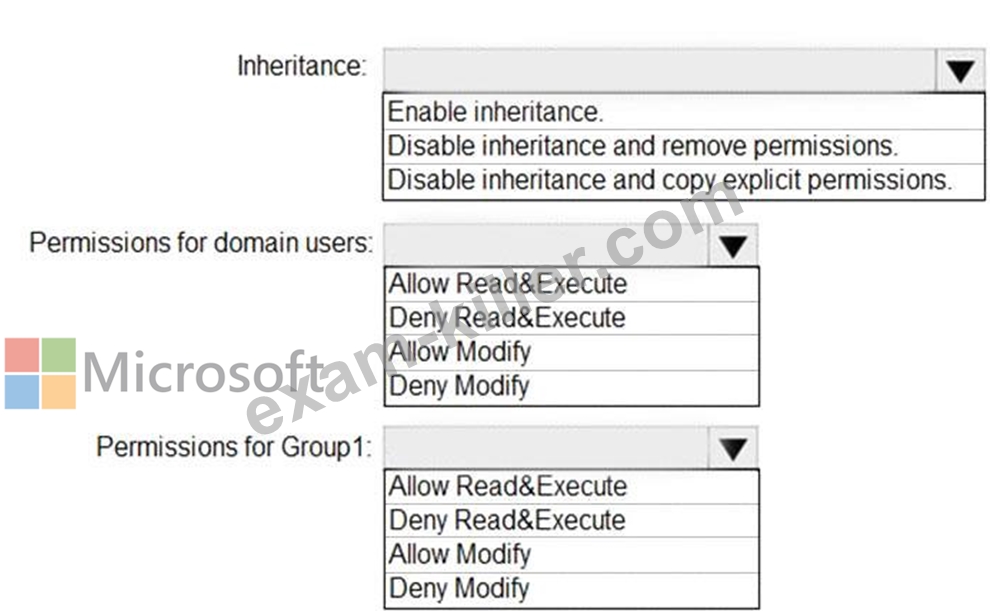
Answer:
Explanation:
Explanation
NEW QUESTION 135
Your network contains an Active Directory domain named adatum.com. The domain contains two computers named Computer1 and Computer2 that run Windows 10.
The domain contains the user accounts shown in the following table.
Computer2 contains the local groups shown in the following table.
The relevant user rights assignments for Computer2 are shown in the following table.
For each of the following statements, select Yes if the statement is true. Otherwise, select No.
NOTE: Each correct selection is worth one point.
Answer:
Explanation:
Explanation
Box 1: Yes
User1 is an administrator and has the Allow log on through Remote Desktop Services.
Box 2: No
User2 is a member of Group2 which has the Deny log on through Remote Desktop Services.
Box 3: Yes
User3 is a member of the administrators group and has the Allow log on through Remote Desktop Services.
Note: Deny permissions take precedence over Allow permissions. If a user belongs to two groups, and one of them has a specific permission set to Deny, that user is not able to perform tasks that require that permission even if they belong to a group that has that permission set to Allow.
References:
https://docs.microsoft.com/en-us/azure/devops/organizations/security/about-permissions?view=azure-devops&ta
NEW QUESTION 136
You have a computer named Computer1 that runs Windows 10.
On Computer1, you turn on File History.
You need to protect a folder named D:\Folder1 by using File History.
What should you do?
- A. From the Settings app, configure the Recovery settings
- B. From File History in Control Panel, configure the Advanced settings
- C. From File Explorer, add D:\Folder1 to the Documents library
- D. From Backup and Restore (Windows 7), modify the backup settings
Answer: C
NEW QUESTION 137
You have a workgroup computer named Computer1 that runs Windows 10 and has the users shown in the following table.
You have a file named File1.reg that contains the following content.
You need to identify what occurs when User1 and User2 double-click File1.reg.
What should you identify? To answer, select the appropriate options in the answer area.
NOTE: Each correct selection is worth one point.
Answer:
Explanation:
Explanation
Box 1:
User1 is a member of the Administrators group so has permission to add keys to both registry hives.
Box 2:
User2 is a standard user so does not have permission to add a key to the HKEY_LOCAL_MACHINE registry hive so Key2 will not be imported.
NEW QUESTION 138
Your network contains an Active Directory domain. The domain contains 1,000 computers that run Windows
10.
You discover that when users are on their lock screen, they see a different background image every day, along with tips for using different features in Windows 10.
You need to disable the tips and the daily background image for all the Windows 10 computers.
Which Group Policy settings should you modify?
- A. Turn off the Windows Welcome Experience
- B. Turn off all Windows spotlight features
- C. Turn off Windows Spotlight on Settings
- D. Do not suggest third-party content in Windows spotlight
Answer: B
Explanation:
Explanation
References:
https://docs.microsoft.com/en-us/windows/configuration/windows-spotlight
NEW QUESTION 139
You have a computer named Computer1 that runs Windows 10 and is joined to an Active Directory domain named adatum.com.
A user named Admin1 signs in to Computer1 and runs the whoami command as shown in the following exhibit.
Use the drop-down menus to select the answer choice that completes each statement based on the information presented in the graphic.
NOTE: Each correct selection is worth one point.
Answer:
Explanation:
Explanation
NEW QUESTION 140
Note: This question is part of a series of questions that present the same scenario. Each question in the series contains a unique solution that might meet the stated goals. Some question sets might have more than one correct solution, while others might not have a correct solution.
After you answer a question in this section, you will NOT be able to return to it. As a result, these questions will not appear in the review screen.
You have a computer named Computer1 that runs Windows 10.
You test Windows updates on Computer1 before you make the updates available to other computers.
You install a quality update that conflicts with a custom device driver.
You need to remove the update from Computer1.
Solution: From an elevated command prompt, you run the wusa.execommand and specify the /uninstall parameter.
Does this meet the goal?
- A. No
- B. Yes
Answer: B
Explanation:
Explanation/Reference:
References:
https://support.microsoft.com/en-us/help/934307/description-of-the-windows-update-standalone-installer-in- windows
NEW QUESTION 141
You have a file named Reg1.reg that contains the following content.
What is the effect of importing the file?
- A. A key named command will be renamed as
- B. In a key named Notepad, the command value will be set to notepad.exe".
- C. In a key named command, the default value will be set to
Answer: C
NEW QUESTION 142
You have a computer named Computer1 that runs Windows 10.
On Computer1, you create the local users shown in the following table.
Which three user profiles will persist after each user signs out? Each correct answer presents part of the solution.
NOTE: Each correct selection is worth one point.
- A. User1
- B. User3
- C. User2
- D. User5
- E. User4
Answer: A,D,E
NEW QUESTION 143
Your network contains an Active Directory domain. The domain contains a computer named Computer1 that runs Windows 10.
The domain contains the users shown in the following table.
Computer1 has the local users shown in the following table.
All users have Microsoft accounts.
Which two users can be configured to sign in by using their Microsoft account? Each correct answer presents part of the solution.
NOTE: Each correct selection is worth one point.
- A. User3
- B. User2
- C. User1
- D. User5
- E. User4
Answer: D,E
NEW QUESTION 144
Your network contains an Active Directory domain. The domain contains the users shown in the following table.
The domain contains a computer named Computer1 that runs Windows 10. Computer1 contains a folder named Folder1 that has the following permissions:
User2: Deny Write
Group1: Allow Read
Group2: Allow Modify
Folder1 is shared as Share1$. Share1$ has the following configurations:
Everyone: Allow Full control
Access-based enumeration: Enabled
For each of the following statements, select Yes if the statement is true. Otherwise, select No.
NOTE: Each correct selection is worth one point.
Answer:
Explanation:
References:
https://www.varonis.com/blog/ntfs-permissions-vs-share/
http://www.ntfs.com/ntfs-permissions-file-advanced.htm
https://docs.microsoft.com/en-us/windows-server/storage/dfs-namespaces/enable-access-based-enumeration-on-a-namespace
NEW QUESTION 145
You have 200 computers that run Windows 10 and are joined to an Active Directory domain.
You need to enable Windows Remote Management (WinRM) on all the computers by using Group Policy.
Which three actions should you perform? Each correct answer presents part of the solution.
NOTE: Each correct selection is worth one point.
- A. Set the Startup Type of the Remote Registry service to Automatic.
- B. Enable the Windows Firewall: Allow inbound remote administration exception setting.
- C. Enable the Allow Remote Shell access setting.
- D. Enable the Windows Firewall: Allow inbound Remote Desktop exceptions setting.
- E. Enable the Allow remote server management through WinRM setting.
- F. Set the Startup Type of the Windows Remote Management (WS-Management) service to Automatic.
Answer: B,E,F
Explanation:
Explanation
References:
https://support.auvik.com/hc/en-us/articles/204424994-How-to-enable-WinRM-with-domain-controller-Group-
NEW QUESTION 146
You enable Windows PowerShell remoting on a computer that runs Windows 10.
You need to limit which PowerShell cmdlets can be used in a remote session.
Which three actions should you perform in sequence? To answer, move the appropriate actions from the list of actions to the answer area and arrange them in the correct order.
Answer:
Explanation:
Explanation:
Read more: https://devblogs.microsoft.com/scripting/build-constrained-powershell-endpoint-using-configuration-file/
NEW QUESTION 147
Please wait while the virtual machine loads. Once loaded, you may proceed to the lab section. This may take a few minutes, and the wait time will not be deducted from your overall test time.
When the Next button is available, click it to access the lab section. In this section, you will perform a set of tasks in a live environment. While most functionality will be available to you as it would be in a live environment, some functionality (e.g., copy and paste, ability to navigate to external websites) will not be possible by design.
Scoring is based on the outcome of performing the tasks stated in the lab. In other words, it doesn't matter how you accomplish the task, if you successfully perform it, you will earn credit for that task.
Labs are not timed separately, and this exam may more than one lab that you must complete. You can use as much time as you would like to complete each lab. But, you should manage your time appropriately to ensure that you are able to complete the lab(s) and all other sections of the exam in the time provided.
Please note that once you submit your work by clicking the Next button within a lab, you will NOT be able to return to the lab.
Username and password
Use the following login credentials as needed:
To enter your password, place your cursor in the Enter password box and click on the password below.
Username: Contoso/Administrator
Password: Passw0rd!
The following information is for technical support purposes only:
Lab Instance: 11145882

Users in the Finance group report that they cannot copy files to Client1\Finance.
You need to resolve the issue.
To complete this task, sign in to the required computer or computers.
Answer:
Explanation:
See explanation below.
Explanation
* Open File Explorer.
* Browse and find the file or folder you want to have full access.
* Right-click it, and select Properties.
* Click the Security tab to access the NTFS permissions.
* Click the Advanced button.
* On the "Advanced Security Settings" page, you need to click the Change link, in the Owner's field.
* Click the Advanced button.
* On the "Select User or Group" page, click the
* From the search result, select your user account, and click
* On the "Select User or Group" page, click
* Click Apply.
* Click OK.
* Click OK again.
* Click OK one more time to complete this task.
It's important to note that if you're taking ownership of a folder, you can check the Replace ownership on subcontainers and object option in the Advanced Security Settings page to take control of the subfolders inside of the folder.
Now you'll need to grant full access control to your account, to do this use the following steps:
* Right-click the file or folder and select
* Click the Security tab to access the NTFS permissions.
* Click the Advanced button.
* Under the Permissions tab, click Add.
* Click Select a principal to add your user account.
* On the "Select User or Group" page, click the Find Now button.
* From the search result, select your user account, and click OK.
* On the "Select User or Group" page, click OK.
* On "Permission Entry", check the Full control option.
* Click OK.
* Click OK.
* Click Apply.
* Click OK.
* Click OK to close the file or folder properties to complete the task.
You can now assign the necessary permissions to the Finance group.
If you right-click on a file or folder, choose tab, we can now try to edit some permissions. Go ahead and click the At this point, there are a couple of things you can do. Firstly, you'll notice that the Allow column is probably greyed out and can't be edited. This is because of the inheritance I was talking about earlier. However, you can check items on the Deny column.
When you click the Add button, you have to type in the user name or group name into the box and then click on Check Names to make sure it's correct. If you don't remember the user or group name, click on the Advanced button and then just click . It will show you all the users and groups.
Click OK and the user or group will be added to the access control list. Now you can check the Allow column or Deny column.
Reference:
https://www.windowscentral.com/how-take-ownership-files-and-folders-windows-10
https://www.online-tech-tips.com/computer-tips/set-file-folder-permissions-windows/
NEW QUESTION 148
You have the source files shown in the following table.
You mount an image from Image1.wim to a folder named C:\Mount.
You need to add the French language pack to the mounted image.
How should you complete the command? To answer, select the appropriate options in the answer area.
NOTE: Each correct selection is worth one point.
Answer:
Explanation:
Reference:
https://docs.microsoft.com/en-us/windows-hardware/manufacture/desktop/add-language-packs-to-windows
NEW QUESTION 149
SIMULATION
Please wait while the virtual machine loads. Once loaded, you may proceed to the lab section. This may take a few minutes, and the wait time will not be deducted from your overall test time.
When the Next button is available, click it to access the lab section. In this section, you will perform a set of tasks in a live environment. While most functionality will be available to you as it would be in a live environment, some functionality (e.g., copy and paste, ability to navigate to external websites) will not be possible by design.
Scoring is based on the outcome of performing the tasks stated in the lab. In other words, it doesn't matter how you accomplish the task, if you successfully perform it, you will earn credit for that task.
Labs are not timed separately, and this exam may more than one lab that you must complete. You can use as much time as you would like to complete each lab. But, you should manage your time appropriately to ensure that you are able to complete the lab(s) and all other sections of the exam in the time provided.
Please note that once you submit your work by clicking the Next button within a lab, you will NOT be able to return to the lab.
Username and password
Use the following login credentials as needed:
To enter your password, place your cursor in the Enter password box and click on the password below.
Username: Contoso/Administrator
Password: Passw0rd!
The following information is for technical support purposes only:
Lab Instance: 11145882
You need to create an HTML report that shows which policies and policy settings are applied to CONTOSO\User1 on Client1. You must save the output to a file named Report.html in a folder named Folder1 on the C drive of Client1.
To complete this task, sign in to the required computer or computers.
- A. On Client1, log in as administrator.
Open command prompt and type:
gpresult /h CONTOSO\User1\C:\Folder1\Report.html - B. On Client1, log in as administrator.
Open command prompt and type:
gpresult /h CONTOSO\User1\E:\Folder1\Report.html
Answer: A
NEW QUESTION 150
......
Step by Step Guide to Prepare for MD-100 Exam: https://www.exam-killer.com/MD-100-valid-questions.html
Windows 10 MD-100 Real Exam Questions and Answers FREE Updated: https://drive.google.com/open?id=1Z37yRaYIBkp5FM-0fiimSJ3mhl9U_V0a
