

[Jun-2026] AB-100 Exam Dumps, AB-100 Practice Test Questions
Attested AB-100 Dumps PDF Resource [2026]
NEW QUESTION # 20
A company has Microsoft 365 Copilot agents.
You need to design a security solution for the agents. The solution must meet the following requirements:
- Identify and mitigate potential risks that relate to AI use.
- Protect AI apps and the sensitive data processed or generated by the
agents.
- Support responsible AI governance by retaining and logging
interactions, detecting policy violations, and investigating incidents.
Which two components should you include in the design? Each correct answer presents part of the solution.
NOTE: Each correct selection is worth one point.
- A. role-based access control (RBAC) in Microsoft Foundry
- B. Microsoft Purview
- C. Microsoft Defender
- D. Azure AI Content Safety
Answer: B,C
Explanation:
To secure Microsoft 365 Copilot agents, you can implement a unified solution using Microsoft Purview for data governance and Microsoft Defender for real-time threat protection. This combination identifies risks, protects sensitive data, and ensures responsible AI governance through continuous monitoring and incident investigation.
Reference:
https://techcommunity.microsoft.com/blog/microsoft365copilotblog/security-and-governance- innovations-for-microsoft-365-copilot-and-agents-from-ig/4476172
NEW QUESTION # 21
A company has a customer order system that creates sales orders manually.
You need to design an AI solution to automate the following tasks as part of the system:
- Save the order details to a database.
- Update the order status in the database.
- Extract the order details from an order file.
- Prepare and send a confirmation email to customers.
The solution must minimize development effort and support intelligent automation and solution integration.
What should you include in the design?
- A. a multi-agent solution that uses Microsoft Foundry Agent Service
- B. a Microsoft Copilot Studio agent that uses Microsoft Power Automate workflows
- C. a workflow in Azure Logic Apps
- D. a multi-agent solution that uses the Semantic Kernel SDK
Answer: B
Explanation:
To create this system, you'll need to integrate Microsoft Copilot Studio with Power Automate and AI Builder. This combination allows your agent to not only "talk" but also "act" by executing complex backend workflows.
Solution Architecture
Front-end: A Copilot Studio agent serves as the interface, receiving order requests or files from customers.
Brain (Logic): Power Automate cloud flows act as the "skills" for your agent, handling all database and email operations.
Data Extraction: AI Builder (Document Processing) extracts specific fields (like Item ID, Quantity, or Customer Name) from uploaded order files.
Storage: Microsoft Dataverse or SQL Server functions as the database to save and update order records.
Reference:
https://medium.com/@sushmita.sg/build-an-ai-powered-customer-support-system-in-2-hours-no- code-using-microsoft-copilot-2e3275dbbee5
NEW QUESTION # 22
Hotspot Question
You are designing a testing solution for a Microsoft Copilot Studio agent that integrates with Microsoft Dynamics 365 Customer Service and Dynamics 365 Sales.
You need to design end-to-end scenarios to test the agent's ability to perform the following actions:
- Coordinate tasks and data interactions across both Dynamics 365 apps.
- Interpret user input and provide contextually relevant outputs.
Which test scenario and metric should you include in the design? To answer, select the appropriate options in the answer area.
NOTE: Each correct selection is worth one point.
Answer:
Explanation:
Explanation:
Box 1: Run task-based scenarios that involve both apps
Test scenario
Task-Based Testing Scenarios
Run these end-to-end scenarios to verify the agent's ability to interpret context and coordinate data:
Scenario 1: Cross-Sell Opportunity Discovery
Task: While resolving a support case in Customer Service, ask the agent: "Are there any active sales opportunities for this account?".
Success Criteria: The agent retrieves the relevant Opportunity from Sales, summarizes it, and suggests a follow-up action for the sales team.
Scenario 2: Integrated Case/Lead Creation
Task: A user mentions a new product interest during a support chat. Command the agent:
"Create a lead in Sales based on this support conversation".
Success Criteria: The agent parses the conversation history and creates a Lead record in Sales with the correct customer context.
Scenario 3: Proactive Account Health Check
Task: Before a sales meeting, ask: "Summarize recent support issues for this account".
Success Criteria: The agent identifies open tickets in Customer Service and provides a summary to the Sales professional to prevent walking into a "blind" meeting.
Box 2: Track the successful completion of cross-app tasks
Metric
Key Metrics for Success
Track these specific metrics in the Copilot Studio Analytics tab or the Power Platform Admin Center:
*-> Resolution Rate (Cross-App): The percentage of sessions where the agent successfully completed a task requiring data from both apps without manual intervention.
Deflection Rate: Reduction in human handoffs for tasks that previously required an agent to switch manually between Sales and Service hubs.
Task Success Threshold: Define a minimum quality score for LLM-based responses to ensure the context provided from the "other" app is accurate.
Agent Assisted Hours Gained: Measure the time saved by the agent performing these cross-app queries versus a human doing so manually.
Reference:
https://walkingtree.tech/dynamics-365-agents-with-microsoft-copilot-studio
https://learn.microsoft.com/en-us/power-platform/admin/monitoring/monitor-copilot-studio
NEW QUESTION # 23
Case Study 1 - Fabrikam, Inc
Background
Fabrikam, Inc., is a global consumer goods company that is undergoing a digital transformation initiative to migrate its entire infrastructure to the Microsoft cloud. As a key element of this cloud migration, the company will implement Microsoft Dynamics 365 Sales, moving away from the current on-premises proprietary technologies used by its business-to-business (B2B) sales team.
As part of the cloud migration, Fabrikam will adopt an AI-first approach to its business solutions and implement AI solutions, wherever possible, to streamline operations.
Problem Statements
Fabrikam's infrastructure currently relies on various on-premises systems that require sales executives to use corporate computers with physical keyboards to access business information during customer interactions. Mobile phones cannot be used for these purposes, as the systems depend on keyboard input. As a result, the sales executives spend a lot of time using keyboards to search for data on several disparate systems and file servers, rather than focusing on the customers. This affects the customer experience.
Fabrikam stakeholders are concerned that users will be hesitant to adopt AI. If the AI initiatives are NOT adopted, cost savings will never be realized. Additionally, funding for future AI initiatives will depend on demonstrating an increase in AI adoption month over month. As the AI agent initiative for the sales team will be the first for Fabrikam, the rapid adoption of the agent is a high priority.
Planned Initiatives
General
Fabrikam management has prioritized AI-driven projects to improve efficiency, customer engagement, and responsible AI adoption. The current application infrastructure is on-premises and must be migrated to the cloud to support the adoption of these technologies.
Infrastructure Migration
Fabrikam plans to migrate from its current on-premises infrastructure to a completely cloud-based topology; this will include user authentication, the security framework, and, primarily, the adoption of the services by end users.
All the data from the different systems will be consolidated into a single data source - a common data model that will use a Microsoft Dataverse environment as a single source of truth (SSOT) for the sales team.
Sales Cycle Enablement
To achieve the company's objectives, Fabrikam intends to implement the following strategies to enhance the sales cycle:
- Use low-code development to create a single AI agent that has
Dataverse as its core component.
- Ensure that sales managers can access unanswered correspondence from
prospects and intervene as appropriate.
- Replace the previous proprietary software with Dynamics 365 Sales to
track sales cycles and customer interactions.
- Have the sales executives use Dynamics 365 Sales to track
interactions for open opportunities and send follow-up communications
to prospects.
- Have the sales executives use handsfree headsets to interact with an
AI agent when they have questions about internal policies or customer
data.
Requirements
Infrastructure Migration
Fabrikam has identified the following infrastructure migration requirements:
- Azure must be used for all future infrastructure workloads.
- The company must follow Microsoft-recommended methodologies for
infrastructure migration to the cloud.
- Any created AI agents must have their return on investment (ROI)
calculated to ensure that the solution will save the company money.
Sales Cycle Enablement
Fabrikam has identified the following requirements for sales cycle enablement:
- The final AI agent must follow Microsoft recommendations for a
conversational user experience.
- A designated checklist must be reviewed to ensure that the AI agent
follows Microsoft deployment recommendations for a compliant solution.
- Detailed telemetry must be logged for the first created AI agent to
help troubleshoot and optimize the agent during the initial AI agent
adoption process.
- Unexpected AI agent actions must end in an escalation to a live
representative. For example, a sales executive must be rerouted to a
representative if the agent cannot answer a question after two failed
attempts.
- The return on investment (ROI) of switching from the current process
to the future process is required for stakeholder sign off.
- The sales team must use Dynamics 365 Sales to correspond with
prospects more quickly and efficiently than currently.
- Sales managers must report on the adoption of the AI agent to key
Fabrikam stakeholders on a monthly basis.
- Any sensitive information, such as user IDs and names, shared via the AI agent must be tracked for future auditing.
Which template should you use for the AI agent to meet the requirements for the sales executives?
- A. AI chat in Microsoft Foundry
- B. AI agents in Microsoft Foundry
- C. IT Helpdesk in Microsoft Copilot Studio
- D. Voice in Microsoft Copilot Studio
Answer: D
Explanation:
Scenario:
Sales Cycle Enablement
To achieve the company's objectives, Fabrikam intends to implement the following strategies to enhance the sales cycle:
Have the sales executives use Dynamics 365 Sales to track interactions for open opportunities and send follow-up communications to prospects.
*-> Have the sales executives use handsfree headsets to interact with an AI agent when they have questions about internal policies or customer data.
To enable handsfree headset interaction with an AI agent for internal policies and customer data in Dynamics 365 Sales, you should use Microsoft Copilot Studio to create a custom agent template.
Here is the breakdown of the recommended approach and templates:
Recommended Template
Voice-enabled agent template (in Copilot Studio): This template provides the foundational, pre- configured setup for Interactive Voice Response (IVR) capabilities, allowing for natural language voice inputs and text-to-speech output.
Internal Data Knowledge Source: Within this agent, you will connect to Dataverse (for customer data) and configure Knowledge Sources (for internal policy documents).
Note:
To implement a hands-free AI agent for Dynamics 365 Sales using the Voice agent template in Microsoft Copilot Studio, follow these steps to enable voice-first interactions for internal policies and customer data.
1. Create a Voice-Enabled Agent
2. Configure Hands-Free Interaction
3. Connect to Internal Data
Reference:
https://learn.microsoft.com/en-us/dynamics365/contact-center/administer/bot-scenario-configure
NEW QUESTION # 24
A company has an AI solution that uses Azure OpenAI models.
You need to recommend a governance solution that monitors and audits changes to model configurations and data usage. The solution must minimize administrative effort.
What should you include in the recommendation?
- A. Microsoft Purview
- B. Azure Monitor
- C. Azure API Management
- D. Azure Policy
- E. Azure Stream Analytics
Answer: B
Explanation:
Azure Monitor is the primary service for monitoring and auditing Azure OpenAI model configurations and data usage. By combining Azure Monitor with diagnostic settings, you can track management operations, analyze token consumption, and audit prompt/response data.
Reference:
https://learn.microsoft.com/en-us/azure/azure-monitor/fundamentals/overview
NEW QUESTION # 25
Hotspot Question
You need to design a multi-agent solution that will include a custom agent. The solution must meet the following requirements:
- Define the rules and constraints that the agent must follow.
- Automate a backend process that involves data movement between
services and runs independently of the agent's reasoning steps.
What should you include in the design for each requirement? To answer, select the appropriate options in the answer area.
NOTE: Each correct selection is worth one point.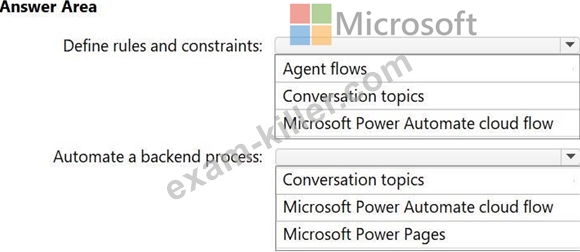
Answer:
Explanation:
Explanation:
Box 1: Conversation topics
Define the rules and constraints that the agent must follow.
In a Microsoft AI project using Microsoft Copilot Studio, you define the rules, constraints, and dialogue paths for a custom agent primarily through Topics. Topics act as the agent's
"competencies," determining how a conversation plays out based on specific user intents.
To use topics for defining agent behavior and constraints, follow these core principles:
Define Conversation Paths: Use topics to map out discrete, structured paths for the agent to follow. This allows you to enforce specific procedures, such as user verification, before providing sensitive information.
Set Triggers: Each topic begins with a trigger (phrases, keywords, or events) that signals when the agent should switch to a specific set of rules or logic.
Enforce Logic via Nodes: Within a topic, use nodes-such as questions, conditions, and actions-to define the logic, variables, and branching paths the agent must follow.
Modularize with "Bite-size" Topics: Break down complex agent logic into smaller, manageable topics. You can use the Redirect node to pass the conversation (and its constraints) from one topic to another.
Handle Errors and Fallbacks: Use System Topics (like On Error or Escalate) to define how the agent should behave when it hits a constraint it cannot resolve or fails to understand a query.
Box 2: Microsoft Power Automate cloud flow
Automate a backend process that involves data movement between services and runs independently of the agent's reasoning steps.
In a Microsoft multi-agent project, you can use Power Automate cloud flows to handle backend data movement independently of an agent's reasoning steps. This approach is often referred to as classic orchestration.
By offloading structured, rule-based tasks to a cloud flow, you ensure that high-volume data operations or multi-service integrations remain deterministic and reliable, while your custom agents focus on dynamic, probabilistic decision-making.
Reference:
https://learn.microsoft.com/en-us/microsoft-copilot-studio/guidance/topics-overview
https://companial.com/blog/unlocking-intelligent-automation
NEW QUESTION # 26
Hotspot Question
A company uses Microsoft Dynamics 365 Supply Chain Management.
You are designing an AI supply chain process that meets the following requirements:
- Provides managers with AI-driven insights that surface key
information from customer orders
- Helps planners use AI to anticipate future product needs more
accurately
You need to recommend which Microsoft Copilot features to include in the design.
What should you recommend for each requirement? To answer, select the appropriate options in the answer area.
NOTE: Each correct selection is worth one point.
Answer:
Explanation:
Explanation:
Box 1: AI summaries with Copilot
Provides managers with AI-driven insights that surface key information from customer orders To provide managers with AI-driven insights from customer orders in Dynamics 365 Supply Chain Management, use the AI summaries with Copilot feature, specifically leveraging the embedded Customer Summary capabilities. This tool provides instant, personalized overviews of critical data, such as backordered items, credit limits, and risk indicators, directly within the workspace.
Box 2: Generative insights for Demand planning
Helps planners use AI to anticipate future product needs more accurately The Copilot Generative insights for Demand planning feature in Microsoft Dynamics 365 Supply Chain Management enables demand planners to move from reactive, manual forecasting to proactive, AI-driven demand anticipation. By analyzing, clustering, and interpreting vast datasets, Copilot helps identify patterns such as seasonality and signal correlations to improve accuracy.
Reference:
https://www.randgroup.com/insights/tip-of-the-month/finance-operations-totm/dynamics-365- finance-operations-tip-of-the-month-work-smarter-with-copilot-in-d365-finance-supply-chain- management/
https://learn.microsoft.com/en-us/dynamics365/release-plan/2025wave2/enterprise-resource- planning/dynamics365-supply-chain-management/analyze-demand-enhanced-generative- insights-demand-planning
NEW QUESTION # 27
A company has a Microsoft Copilot Studio agent that provides answers based on a knowledge base for customer support.
Users report that, occasionally, the agent provides inaccurate answers.
You need to use metrics from the Analytics tab in Copilot Studio to identify the cause of the inaccuracies.
Which two options should you use? Each correct answer presents part of the solution.
NOTE: Each correct selection is worth one point.
- A. quality of generated answers
- B. topic usage and topics with low resolution
- C. survey results
- D. engagement, resolution, and escalation rates
- E. session information and session outcomes
Answer: B,D
Explanation:
[C]
You can use the Analytics dashboard to identify and fix inaccurate responses by focusing on specific performance signals:
*-> Topics with Low Resolution: This metric identifies individual topics where sessions frequently end without a successful outcome. A low resolution rate often indicates that the topic's logic is flawed, the content is outdated, or it fails to address the user's specific intent.
*-> Topic Usage: High usage of certain topics combined with low resolution or high escalation rates points to critical knowledge gaps. Use this to prioritize which parts of your knowledge base need immediate refinement.
Unrecognized Utterances: Review these to find user phrases that didn't trigger any custom topic, indicating missing content or the need for new trigger phrases.
Analyze User Questions by Theme: Copilot Studio uses AI to group generative responses into themes. You can review these clusters to see which themes have poor response quality and need better grounding or data hygiene.
User Feedback (Thumbs Up/Down): Review specific messages with negative feedback in the Analytics tab to understand exactly where the AI is hallucinating or providing incomplete data.
[D]
In Microsoft Copilot Studio, you can use analytics to pinpoint why your agent is providing inaccurate answers by following a structured improvement checklist.
Using Metrics to Locate Problems
*-> Engagement Rate: A low engagement rate often indicates that your triggers are misconfigured or too broad, causing the agent to initiate the wrong topic or fail to recognize user intent entirely.
*-> Resolution Rate: Identify specific topics with low resolution. If a topic has a high volume of sessions but fails to reach a "Resolved" state, it usually means the knowledge source is outdated, mismatched, or the generative answers are not grounded properly.
*-> Escalation Rate: High escalation rates for particular topics are "red flag" drivers. Use the Escalation Rate Drivers chart to see which topics most frequently force a hand-off to a human agent, indicating where the AI's knowledge or logic is insufficient.
Reference:
https://learn.microsoft.com/en-au/microsoft-copilot-studio/guidance/analytics
https://support.accelevents.com/en/articles/5456691-session-analytics
NEW QUESTION # 28
You need to recommend a Microsoft Power Platform business solution that consolidates data from multiple internal and external data sources. The solution must meet the following requirements:
- Provide the data as a centralized source for multiple AI systems,
including Microsoft Copilot Studio agents, Dynamics 365 applications,
and external AI models.
- Support built-in data classification and protection policies.
- Provide data for grounding and analytics.
What should you include in the recommendation?
- A. Microsoft Dataverse
- B. Azure Data Lake Storage
- C. Azure Cosmos DB
- D. a Microsoft Power BI semantic model
Answer: A
Explanation:
Microsoft Dataverse is the ideal foundational component for this scenario, serving as the secure, centralized data platform for the Microsoft Power Platform, Dynamics 365, and AI integrations. By using Dataverse, the business can consolidate, protect, and utilize data across Copilot Studio agents, Dynamics 365 applications, and analytics tools, addressing all stated requirements.
Here is how Dataverse fulfills the requirements in the described scenario:
Centralized Source: It serves as the primary data storage and management engine for Power Platform, Dynamics 365, and Copilot Studio. It consolidates data into a unified data model (Common Data Model), ensuring consistency across internal and external sources.
Internal & External Integration: Dataverse supports data integration from diverse sources using tools like Power Query, Azure Data Factory, and virtual tables that map external data in real-time.
Data Classification & Protection: It features built-in, enterprise-grade security.
AI Grounding & Analytics:
- Grounding: It acts as the knowledge source for Copilot Studio agents, providing the necessary business context for accurate generative AI responses.
- Analytics: It integrates natively with Power BI for reporting and can synchronize with Microsoft Fabric or Azure Synapse for large-scale data modeling and advanced analytics.
Reference:
https://avantiico.com/solutions/microsoft-platforms/microsoft-dataverse
NEW QUESTION # 29
Case Study 1 - Fabrikam, Inc
Background
Fabrikam, Inc., is a global consumer goods company that is undergoing a digital transformation initiative to migrate its entire infrastructure to the Microsoft cloud. As a key element of this cloud migration, the company will implement Microsoft Dynamics 365 Sales, moving away from the current on-premises proprietary technologies used by its business-to-business (B2B) sales team.
As part of the cloud migration, Fabrikam will adopt an AI-first approach to its business solutions and implement AI solutions, wherever possible, to streamline operations.
Problem Statements
Fabrikam's infrastructure currently relies on various on-premises systems that require sales executives to use corporate computers with physical keyboards to access business information during customer interactions. Mobile phones cannot be used for these purposes, as the systems depend on keyboard input. As a result, the sales executives spend a lot of time using keyboards to search for data on several disparate systems and file servers, rather than focusing on the customers. This affects the customer experience.
Fabrikam stakeholders are concerned that users will be hesitant to adopt AI. If the AI initiatives are NOT adopted, cost savings will never be realized. Additionally, funding for future AI initiatives will depend on demonstrating an increase in AI adoption month over month. As the AI agent initiative for the sales team will be the first for Fabrikam, the rapid adoption of the agent is a high priority.
Planned Initiatives
General
Fabrikam management has prioritized AI-driven projects to improve efficiency, customer engagement, and responsible AI adoption. The current application infrastructure is on-premises and must be migrated to the cloud to support the adoption of these technologies.
Infrastructure Migration
Fabrikam plans to migrate from its current on-premises infrastructure to a completely cloud-based topology; this will include user authentication, the security framework, and, primarily, the adoption of the services by end users.
All the data from the different systems will be consolidated into a single data source - a common data model that will use a Microsoft Dataverse environment as a single source of truth (SSOT) for the sales team.
Sales Cycle Enablement
To achieve the company's objectives, Fabrikam intends to implement the following strategies to enhance the sales cycle:
- Use low-code development to create a single AI agent that has
Dataverse as its core component.
- Ensure that sales managers can access unanswered correspondence from
prospects and intervene as appropriate.
- Replace the previous proprietary software with Dynamics 365 Sales to
track sales cycles and customer interactions.
- Have the sales executives use Dynamics 365 Sales to track
interactions for open opportunities and send follow-up communications
to prospects.
- Have the sales executives use handsfree headsets to interact with an
AI agent when they have questions about internal policies or customer
data.
Requirements
Infrastructure Migration
Fabrikam has identified the following infrastructure migration requirements:
- Azure must be used for all future infrastructure workloads.
- The company must follow Microsoft-recommended methodologies for
infrastructure migration to the cloud.
- Any created AI agents must have their return on investment (ROI)
calculated to ensure that the solution will save the company money.
Sales Cycle Enablement
Fabrikam has identified the following requirements for sales cycle enablement:
- The final AI agent must follow Microsoft recommendations for a
conversational user experience.
- A designated checklist must be reviewed to ensure that the AI agent
follows Microsoft deployment recommendations for a compliant solution.
- Detailed telemetry must be logged for the first created AI agent to
help troubleshoot and optimize the agent during the initial AI agent
adoption process.
- Unexpected AI agent actions must end in an escalation to a live
representative. For example, a sales executive must be rerouted to a
representative if the agent cannot answer a question after two failed
attempts.
- The return on investment (ROI) of switching from the current process
to the future process is required for stakeholder sign off.
- The sales team must use Dynamics 365 Sales to correspond with
prospects more quickly and efficiently than currently.
- Sales managers must report on the adoption of the AI agent to key
Fabrikam stakeholders on a monthly basis.
- Any sensitive information, such as user IDs and names, shared via the AI agent must be tracked for future auditing.
Which tool should you use for the prospect communication requirements in Dynamics 365 Sales?
- A. Azure AI Search
- B. the Voice template Microsoft Copilot Studio
- C. Deep Research in Microsoft Foundry Agent Service
- D. Copilot email assist
Answer: D
Explanation:
Scenario:
Requirements
*-> The sales team must use Dynamics 365 Sales to correspond with prospects more quickly and efficiently than currently.
Sales Cycle Enablement
To achieve the company's objectives, Fabrikam intends to implement the following strategies to enhance the sales cycle:
Ensure that sales managers can access unanswered correspondence from prospects and intervene as appropriate.
Have the sales executives use Dynamics 365 Sales to track interactions for open opportunities and send follow-up communications to prospects.
---
In Dynamics 365 Sales, the Copilot email assist feature acts as a powerful accelerator for handling prospects by automating the most time-consuming parts of communication.
Here is how it helps you move faster and more efficiently:
Instant Drafting: You can generate professional-looking email drafts in seconds by choosing a predefined category (like "reply to an inquiry" or "follow up") or by entering your own custom prompt.
Context-Aware Personalization: The AI uses data directly from your CRM-such as past interactions, deal status, and customer notes-to ensure every message is tailored specifically to that prospect's needs.
Tone & Style Adjustments: You can quickly refine the length and tone (e.g., formal, friendly, or urgent) of a draft to better resonate with a particular recipient.
Summarization: When dealing with long email chains, Copilot provides a concise summary of the conversation history, allowing you to catch up instantly without reading through every old message.
Actionable Reminders: It monitors your inbox to identify pending action items or key customer requests you may have missed, ensuring no prospect falls through the cracks.
Seamless Integration: These tools are available directly within the Dynamics 365 Email Rich Text Editor and across Microsoft 365 apps like Outlook and Teams, keeping you in your flow of work.
Reference:
https://learn.microsoft.com/en-us/dynamics365/sales/copilot-overview
NEW QUESTION # 30
Case Study 1 - Fabrikam, Inc
Background
Fabrikam, Inc., is a global consumer goods company that is undergoing a digital transformation initiative to migrate its entire infrastructure to the Microsoft cloud. As a key element of this cloud migration, the company will implement Microsoft Dynamics 365 Sales, moving away from the current on-premises proprietary technologies used by its business-to-business (B2B) sales team.
As part of the cloud migration, Fabrikam will adopt an AI-first approach to its business solutions and implement AI solutions, wherever possible, to streamline operations.
Problem Statements
Fabrikam's infrastructure currently relies on various on-premises systems that require sales executives to use corporate computers with physical keyboards to access business information during customer interactions. Mobile phones cannot be used for these purposes, as the systems depend on keyboard input. As a result, the sales executives spend a lot of time using keyboards to search for data on several disparate systems and file servers, rather than focusing on the customers. This affects the customer experience.
Fabrikam stakeholders are concerned that users will be hesitant to adopt AI. If the AI initiatives are NOT adopted, cost savings will never be realized. Additionally, funding for future AI initiatives will depend on demonstrating an increase in AI adoption month over month. As the AI agent initiative for the sales team will be the first for Fabrikam, the rapid adoption of the agent is a high priority.
Planned Initiatives
General
Fabrikam management has prioritized AI-driven projects to improve efficiency, customer engagement, and responsible AI adoption. The current application infrastructure is on-premises and must be migrated to the cloud to support the adoption of these technologies.
Infrastructure Migration
Fabrikam plans to migrate from its current on-premises infrastructure to a completely cloud-based topology; this will include user authentication, the security framework, and, primarily, the adoption of the services by end users.
All the data from the different systems will be consolidated into a single data source - a common data model that will use a Microsoft Dataverse environment as a single source of truth (SSOT) for the sales team.
Sales Cycle Enablement
To achieve the company's objectives, Fabrikam intends to implement the following strategies to enhance the sales cycle:
- Use low-code development to create a single AI agent that has
Dataverse as its core component.
- Ensure that sales managers can access unanswered correspondence from
prospects and intervene as appropriate.
- Replace the previous proprietary software with Dynamics 365 Sales to
track sales cycles and customer interactions.
- Have the sales executives use Dynamics 365 Sales to track
interactions for open opportunities and send follow-up communications
to prospects.
- Have the sales executives use handsfree headsets to interact with an
AI agent when they have questions about internal policies or customer
data.
Requirements
Infrastructure Migration
Fabrikam has identified the following infrastructure migration requirements:
- Azure must be used for all future infrastructure workloads.
- The company must follow Microsoft-recommended methodologies for
infrastructure migration to the cloud.
- Any created AI agents must have their return on investment (ROI)
calculated to ensure that the solution will save the company money.
Sales Cycle Enablement
Fabrikam has identified the following requirements for sales cycle enablement:
- The final AI agent must follow Microsoft recommendations for a
conversational user experience.
- A designated checklist must be reviewed to ensure that the AI agent
follows Microsoft deployment recommendations for a compliant solution.
- Detailed telemetry must be logged for the first created AI agent to
help troubleshoot and optimize the agent during the initial AI agent
adoption process.
- Unexpected AI agent actions must end in an escalation to a live
representative. For example, a sales executive must be rerouted to a
representative if the agent cannot answer a question after two failed
attempts.
- The return on investment (ROI) of switching from the current process
to the future process is required for stakeholder sign off.
- The sales team must use Dynamics 365 Sales to correspond with
prospects more quickly and efficiently than currently.
- Sales managers must report on the adoption of the AI agent to key
Fabrikam stakeholders on a monthly basis.
- Any sensitive information, such as user IDs and names, shared via the AI agent must be tracked for future auditing.
Hotspot Question
Which components should you use to meet the sales cycle enablement requirements? To answer, select the appropriate options in the answer area.
NOTE: Each correct selection is worth one point.
Answer:
Explanation:
Explanation:
Scenario:
Use low-code development to create a single AI agent that has Dataverse as its core component.
Box 1: Microsoft Copilot Studio
For AI agent creation
Scenario:
A designated checklist must be reviewed to ensure that the AI agent follows Microsoft deployment recommendations for a compliant solution.
The Microsoft tool that should be used to create the AI agent is Microsoft Copilot Studio.
It is a low-code platform specifically designed for building and managing intelligent agents that integrate with Microsoft Dataverse as a core component for storing data and providing business context. To ensure the agent follows Microsoft's deployment recommendations, users should consult the implementation checklist provided within the Microsoft Copilot Studio documentation.
Key Features of Microsoft Copilot Studio:
Low-Code Interface: Uses a graphical builder or natural language to design agent behaviors and conversation flows.
Dataverse Integration: Leverages Dataverse as the enterprise data platform to ground agents in organizational knowledge and store shared context.
Governance and Compliance: Includes built-in responsible AI features and aligns with enterprise security standards.
Multi-Channel Deployment: Allows publishing agents across Microsoft Teams, websites, and mobile apps.
Box 2: a Fallback topic
For unexpected AI agent actions.
Scenario:
Unexpected AI agent actions must end in an escalation to a live representative. For example, a sales executive must be rerouted to a representative if the agent cannot answer a question after two failed attempts.
In a low-code environment using Microsoft Copilot Studio with Dataverse, you can ensure unexpected AI actions lead to a live representative by configuring specific system topics.
1. Configure the System Fallback Topic
The Fallback system topic triggers when the AI agent cannot match a user's intent to any existing topic or knowledge source with sufficient confidence.
Enable Fallback: In Copilot Studio, navigate to Settings > General Settings > System fallback and click Add.
Action: Edit the Fallback topic to include a Go to topic node that redirects to the Escalate system topic.
2. Implement the Escalate System Topic
The Escalate topic is the primary mechanism for handoffs.
3. Handle Errors and Infinite Loops
Reference:
https://learn.microsoft.com/en-us/power-apps/maker/data-platform/low-code-plugins-copilot- studio
NEW QUESTION # 31
A financial services company uses Microsoft Dynamics 365 Finance.
Currently, the company's support staff manually reviews customer transaction histories to detect potential fraud cases before escalating the cases.
You need to recommend an automation solution for the review process. The solution must ensure that escalations reach a human analyst for final decision making. What should you recommend?
- A. Export the data to a data lake for analysis in Microsoft Power BI.
- B. Use Microsoft 365 Copilot in Word to automatically finalize fraud detection policies.
- C. Deploy an autonomous agent that closes non-fraud cases automatically.
- D. Configure a task agent to generate fraud risk scores for the human analyst to review.
Answer: D
Explanation:
To automate the fraud review process in Microsoft Dynamics 365 Finance while ensuring a human analyst makes the final decision, you should configure the Dynamics 365 Fraud Protection (or integrated Copilot AI agents) to generate risk scores and route high-risk transactions to a manual review queue.
Here is the configuration approach to achieve this:
1. Implement AI-Driven Risk Scoring: Utilize Dynamics 365 Fraud Protection, which uses AI to analyze customer transaction history and assign a risk score (0-999) to each transaction.
2. Define Rules for Escalation: Set up fraud rules in the system to determine which transactions require human intervention. For instance, define a threshold (e.g., a "Minimum score value") where transactions with high fraud probability are automatically flagged.
3. Establish Manual Review Queues: Configure the Manual Review tool to create queues for suspected fraudulent transactions, allowing human analysts to review the AI-generated risk score and transaction history, such as customer behavior, for final, informed decision-making.
4. Use Copilot/AI Agents for Monitoring: Enable AI agents to continuously monitor financial data, such as invoice, payment, and vendor data, and generate alerts for unusual patterns before escalating.
This setup, particularly through the Manual Review workspace, allows for an automated, intelligent, and scalable approach to fraud management.
Reference:
https://www.microsoft.com/en-us/dynamics-365/blog/it-professional/2021/03/25/enhance-your- fraud-workflow-efficiency-with-manual-review/
NEW QUESTION # 32
A company has a Microsoft Copilot Studio agent that uses custom connectors to interact with enterprise APIs.
You need to recommend an application lifecycle management (ALM) process to ensure that the connectors are deployed consistently across development, test, and production environments and meet governance and traceability requirements.
What should you recommend?
- A. Maintain connector definitions in environment variables.
- B. Deploy the APIs as Azure Functions.
- C. Export and import the connectors between the environments as unmanaged solutions.
- D. Manage the connectors as solution components and deploy the components by using ALM pipelines.
Answer: A
Explanation:
To implement a robust Application Lifecycle Management (ALM) process for Microsoft Copilot Studio agents using custom connectors, you must leverage Solutions and Environment Variables to ensure consistency and governance.
1. Solution-Based Management
Always develop your custom connectors and Copilot Studio agents within a Power Platform Solution. This allows you to package all related components (connectors, environment variables, and agents) as a single unit for deployment across your ALM pipeline (Dev → Test → Prod).
2. Implementing Environment Variables
To maintain consistent definitions and meet governance requirements, externalize environment- specific values using Environment Variables:
Host and Base URL: Use environment variables for the API endpoint (e.g., api.dev.enterprise.com vs. api.prod.enterprise.com) to avoid manual edits during deployment.
Security Credentials: For OAuth settings like Client ID and Client Secret, use environment variables with the Secret data type.
Azure Key Vault Integration: For high-security enterprise APIs, store secrets in Azure Key Vault and reference them via secret environment variables to ensure traceability and governance.
Reference:
https://learn.microsoft.com/en-us/copilot/finance/get-started/custom%20connectors/custom- connectors-solutions
NEW QUESTION # 33
Drag and Drop Question
You need to design a Microsoft Copilot Studio agent that meets the following requirements:
- Supports interactive speech responses
- Optimizes decision-making and the accuracy of responses
What should you include in the design for each requirement? To answer, drag the appropriate options to the correct requirements. Each option may be used once, more than once, or not at all. You may need to drag the split bar between panes or scroll to view content.
Answer:
Explanation:
Explanation:
Box 1: Copilot Studio voice features
Supports interactive speech responses
To support interactive speech responses in a Microsoft Copilot Studio agent, you must incorporate specialized voice features and capabilities. These features enable the agent to move beyond chat-based interactions to handle voice-based input (speech-to-text) and output (text-to- speech).
Box 2: A deep reasoning model
Optimizes decision-making and the accuracy of responses
Integrating a deep reasoning model (specifically Azure OpenAI o3) into Microsoft Copilot Studio optimizes decision-making and accuracy by enabling multi-step analysis, logical deduction, and the handling of complex, multi-turn conversations. This capability, enabled via the "reason" keyword in instructions, allows agents to analyze large datasets and provide context-aware, transparent answers, ideal for scenarios like financial analysis or compliance.
Reference:
https://learn.microsoft.com/en-us/microsoft-copilot-studio/voice-overview
https://learn.microsoft.com/en-us/microsoft-copilot-studio/faqs-reasoning
NEW QUESTION # 34
A startup wants to build a customizable, agent-based workflow that can integrate with their internal APIs, retrieve contextual data from various sources, and run complex business logic autonomously. The team has moderate engineering skills but explicitly wants to avoid the overhead of managing underlying infrastructure. Which Microsoft AI service model best fits this requirement for building and deploying their agent-based solution?
- A. IaaS (VM-based custom AI workloads on Azure Virtual Machines)
- B. Dynamics 365 Customer Service Workspace
- C. PaaS (Microsoft Foundry + Azure OpenAI + Azure AI Search + Prompt Flow)
- D. SaaS (Microsoft 365 Copilot)
Answer: C
NEW QUESTION # 35
Drag and Drop Question
A company has an AI solution that uses a Microsoft Copilot Studio agent.
You need to monitor the agent's performance. The solution must meet the following requirements:
- Monitor the agent's telemetry in near-real-time (NRT).
- Download transcripts of full conversations.
- Monitor the agent's usage and performance.
What should you use for each requirement? To answer, drag the appropriate options to the correct requirements. Each option may be used once, more than once, or not at all. You may need to drag the split bar between panes or scroll to view content.
NOTE: Each correct selection is worth one point.
Answer:
Explanation:
Explanation:
Box 1: Application Insights
Monitor the agent's telemetry in near-real-time (NRT).
To monitor Microsoft Copilot Studio agent performance and telemetry in near-real-time (NRT), the best tool to use is Azure Application Insights.
By connecting your Copilot Studio agent to an Azure Application Insights instance, you can capture detailed runtime data, including user messages, topics triggered, and custom events as they happen.
Box 2: Microsoft Power Apps
Download transcripts of full conversations.
To monitor Microsoft Copilot Studio agent performance, you can download full conversation transcripts for the last 29 days using the Power Apps portal to analyze user interactions. Access Dataverse via Power Apps, navigate to tables, select ConversationTranscript, and export the data as a CSV file to identify engagement, resolution, and escalation patterns.
Steps to Download Transcripts via Power Apps:
1. Sign in to make.powerapps.com.
2. Select the correct environment in the top right corner.
3. In the side menu, select Tables (or Data > Entities in older views).
4. Search for and select the ConversationTranscript table.
5. Select Export data from the top menu.
6. Once compiled, select Download exported data to save the file.
Box 3: Copilot Studio
Monitor the agent's usage and performance.
To monitor a Microsoft Copilot Studio agent's usage and performance, you can use the built-in Analytics page in Copilot Studio, which provides comprehensive data on key metrics, conversation outcomes, and user satisfaction.
Reference:
https://reshmeeauckloo.com/posts/copilot-connecting-application-insights
https://learn.microsoft.com/en-us/microsoft-copilot-studio/analytics-overview
https://learn.microsoft.com/en-us/microsoft-copilot-studio/analytics-overview
NEW QUESTION # 36
You are designing a Microsoft Copilot Studio agent that uses a custom Microsoft Foundry model to generate responses.
You need to ensure that the agent can securely connect to and invoke the custom model during user interactions.
What should you include in the design?
- A. Create a custom engine agent.
- B. Add the Microsoft Foundry model as a Copilot Studio skill.
- C. Configure the agent to use classic orchestration.
- D. Create a connection to Microsoft Foundry in the agent.
Answer: D
Explanation:
To create a connection to Microsoft Foundry within a Microsoft Copilot Studio agent and securely invoke a custom model, follow these steps:
1. Connect via the "External Agent" Method
This method allows your Copilot Studio agent to orchestrate and call a specific Microsoft Foundry agent directly.
2. Connect via "Bring Your Own Model" (BYOM)
If you want to use a specific model from the Foundry model catalog for individual prompt actions.
3. Security and Governance
Connecting to Microsoft Foundry ensures enterprise-grade security through:
Entra ID Integration: Agents are assigned a unique Microsoft Entra Agent ID, allowing IT teams to enforce Conditional Access and Identity Governance.
Unified Management: Both your Copilot Studio and Foundry agents can be managed centrally in the Microsoft Entra admin center.
Reference:
https://techcommunity.microsoft.com/blog/azure-ai-foundry-blog/building-secure-governable-ai- agents-with-microsoft-foundry/4472736
NEW QUESTION # 37
......
Latest AB-100 Actual Free Exam Questions Updated 67 Questions: https://www.exam-killer.com/AB-100-valid-questions.html
Free AB-100 Exam Braindumps certification guide Q&A: https://drive.google.com/open?id=1G9YuE2zeCIepCQFV61JYzu9bFbHhLvLd
