

Practice Google Developers Associate-Android-Developer exam. Online Exam Practice Tests with detailed explanations! Pass Associate-Android-Developer with confidence!
Associate-Android-Developer - Google Developers Certification - Associate Android Developer (Kotlin and Java Exam) Practice Tests 2021 | Exam-Killer
NEW QUESTION 36
In general, you should send an AccessibilityEvent whenever the content of your custom view changes. For example, if you are implementing a custom slider bar that allows a user to select a numeric value by pressing the left or right arrows, your custom view should emit an event of type TYPE_VIEW_TEXT_CHANGED whenever the slider value changes. Which one of the following sample codes demonstrates the use of the sendAccessibilityEvent() method to report this event.
- A. override fun onKeyUp(keyCode: Int, event: KeyEvent): Boolean { return when(keyCode) { KeyEvent.KEYCODE_DPAD_LEFT -> { currentValue-- sendAccessibilityEvent(AccessibilityEvent.TYPE_VIEW_TEXT_CHANGED) true
}
...
}
} - B. override fun onKeyUp(keyCode: Int, event: KeyEvent): Boolean { return when(keyCode) { KeyEvent.KEYCODE_ENTER -> { currentValue-- sendAccessibilityEvent (AccessibilityEvent.TYPE_VIEW_CONTEXT_CLICKED) true
}
...
}
} - C. override fun dispatchPopulateAccessibilityEvent(event: AccessibilityEvent): Boolean { return super.dispatchPopulateAccessibilityEvent(event).let { completed -> if (text?.isNotEmpty() == true) { event.text.add(text) true
} else {
completed
}
}
}
Answer: A
NEW QUESTION 37
The following code snippet shows an example of an Espresso test:
- A. @Test
public void greeterSaysHello() {
onView(withId(R.id.name_field)).do(typeText("Steve"));
onView(withId(R.id.greet_button)).do(click());
onView(withText("Hello Steve!")).compare(matches(isDisplayed()));
} - B. @Test
public void greeterSaysHello() {
onView(withId(R.id.name_field)).perform(typeText("Steve"));
onView(withId(R.id.greet_button)).perform(click());
onView(withText("Hello Steve!")).check(matches(isDisplayed()));
} - C. @Rule
public void greeterSaysHello() {
onView(withId(R.id.name_field)).do(typeText("Steve"));
onView(withId(R.id.greet_button)).do(click());
onView(withText("Hello Steve!")).check(matches(isDisplayed()));
}
Answer: B
NEW QUESTION 38
In a common Paging Library architecture scheme, move instances to the correct positions.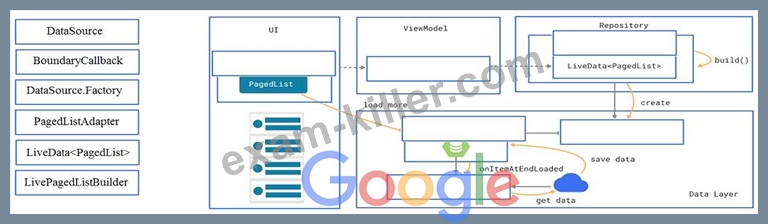
Answer:
Explanation: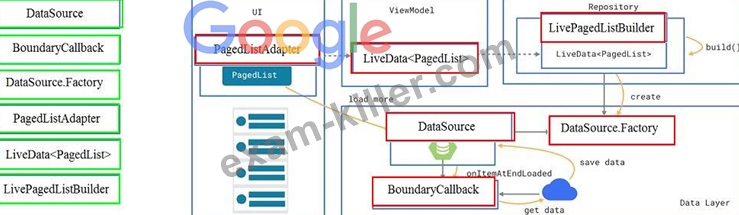
Reference:
https://developer.android.com/topic/libraries/architecture/paging/ui
NEW QUESTION 39
The diagram below shows a basic form of the recommended architecture for apps that use Architecture Components. The architecture consists of a UI controller, a ViewModel that serves LiveData, a Repository, and a Room database. Drag modules to correct places.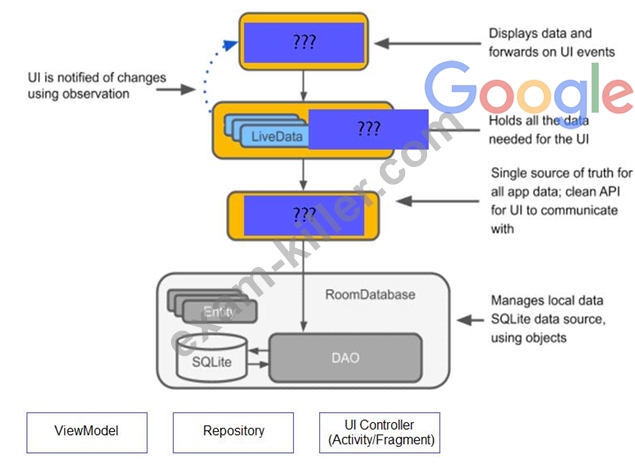
Answer:
Explanation: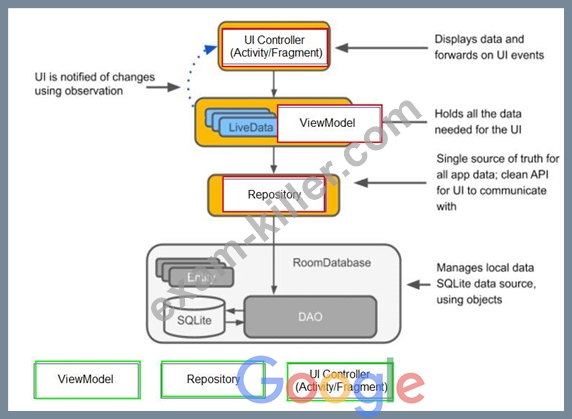
NEW QUESTION 40
SharedPreferences.Editor is an interface used for modifying values in a SharedPreferences object. To mark in the editor that a preference value should be removed, which will be done in the actual preferences once commit() or apply() is called, what method in SharedPreferences.Editor should we use?
- A. remove(String key)
- B. removeAll()
- C. clear()
- D. delete(String key)
Answer: C
Explanation:
clear() method marks in the editor to remove ALL values from the preferences. Once commit is called, the only remaining preferences will be any that you have defined in this editor.
And no delete and removeAll method exists in SharedPreferences.Editor
NEW QUESTION 41
Move the major components of the Android platform to correct places in diagram.
Answer:
Explanation:
Reference:
https://developer.android.com/guide/platform
NEW QUESTION 42
What is a correct part of an Implicit Intent for sharing data implementation?
- A. val sendIntent = Intent().apply { type = Intent.ACTION_SEND;
... - B. val sendIntent = Intent(this, UploadService::class.java).apply { putExtra(Intent.EXTRA_TEXT, textMessage)
... - C. val sendIntent = Intent(this, UploadService::class.java).apply { data = Uri.parse(fileUrl)
... - D. val sendIntent = Intent().apply { action = Intent.ACTION_SEND
...
Answer: D
Explanation:
Create the text message with a string
val sendIntent = Intent().apply { action = Intent.ACTION_SEND
putExtra(Intent.EXTRA_TEXT, textMessage) type = "text/plain"
}
Reference:
https://developer.android.com/guide/components/fundamentals
NEW QUESTION 43
In general, you should send an AccessibilityEvent whenever the content of your custom view changes. For example, if you are implementing a custom slider bar that allows a user to select a numeric value by pressing the left or right arrows, your custom view should emit an event of type TYPE_VIEW_TEXT_CHANGED whenever the slider value changes. Which one of the following sample codes demonstrates the use of the sendAccessibilityEvent() method to report this event.
- A. @Override
public boolean dispatchPopulateAccessibilityEvent(AccessibilityEvent event) { boolean completed = super.dispatchPopulateAccessibilityEvent(event); CharSequence text = getText(); if (!TextUtils.isEmpty(text)) { event.getText().add(text); return true;
}
return completed;
} - B. @Override
public boolean onKeyUp (int keyCode, KeyEvent event) {
if (keyCode == KeyEvent.KEYCODE_DPAD_LEFT) {
currentValue--;
sendAccessibilityEvent(AccessibilityEvent.TYPE_VIEW_TEXT_CHANGED);
return true;
}
...
} - C. @Override
public boolean onKeyUp (int keyCode, KeyEvent event) {
if (keyCode == KeyEvent.KEYCODE_ENTER) {
currentValue--;
sendAccessibilityEvent(AccessibilityEvent.TYPE_VIEW_CONTEXT_CLICKED);
return true;
}
...
}
Answer: B
Explanation:
Reference:
https://developer.android.com/guide/topics/ui/accessibility/custom-views
NEW QUESTION 44
Assume that an app includes a default set of graphics and two other sets of graphics, each optimized for a different device setup:
res/drawable/
Contains default graphics. res/drawable-small-land-stylus/
Contains graphics optimized for use with a device that expects input from a stylus and has a QVGA low- density screen in landscape orientation. res/drawable-ja/ Contains graphics optimized for use with Japanese.
What happens if the app runs on a device that is configured to use Japanese and, at the same time, the device happens to be one that expects input from a stylus and has a QVGA low-density screen in landscape orientation?
- A. Android loads graphics from res/drawable-ja/
- B. Android loads graphics from res/drawable-small-land-stylus/
- C. Android loads graphics from res/drawable/
Answer: A
Explanation:
Reference:
https://developer.android.com/guide/topics/resources/localization
NEW QUESTION 45
"Set the activity content to an explicit view. This view is placed directly into the activity's view hierarchy. It can itself be a complex view hierarchy." This can be done by calling method:
- A. setTheme
- B. setContentView
- C. findViewById
- D. setActionBar
- E. setContentTransitionManager
Answer: B
NEW QUESTION 46
By default, the notification's text content is truncated to fit one line. If you want your notification to be longer, for example, to create a larger text area, you can do it in this way:
- A. NotificationCompat.Builder builder = new NotificationCompat.Builder(this, CHANNEL_ID)
.setContentText("Much longer text that cannot fit one line...")
.setTheme(android.R.style.Theme_LongText);
... - B. NotificationCompat.Builder builder = new NotificationCompat.Builder(this, CHANNEL_ID)
.setContentText("Much longer text that cannot fit one line...")
.setLongText("Much longer text that cannot fit one line..."))
... - C. NotificationCompat.Builder builder = new NotificationCompat.Builder(this, CHANNEL_ID)
.setContentText("Much longer text that cannot fit one line...")
.setStyle(new NotificationCompat.BigTextStyle()
.bigText("Much longer text that cannot fit one line..."))
...
Answer: C
Explanation:
Reference:
https://developer.android.com/training/notify-user/build-notification
NEW QUESTION 47
Once your test has obtained a UiObject object, you can call the methods in the UiObject class to perform user interactions on the UI component represented by that object. You can specify such actions as: (Choose four.)
- A. setText() : Sets the text in an editable field, after clearing the field's content. Conversely, the clearTextField() method clears the existing text in an editable field.
- B. swipeUp() : Performs the swipe up action on the UiObject. Similarly, the swipeDown(), swipeLeft(), and swipeRight() methods perform corresponding actions.
- C. moveTo() : Move this object to arbitrary coordinates.
- D. touch() : Touch the center of the visible bounds of the UI element.
- E. click() : Clicks the center of the visible bounds of the UI element.
- F. dragTo() : Drags this object to arbitrary coordinates.
Answer: A,B,E,F
NEW QUESTION 48
What happens when you create a DAO method and annotate it with @Insert?
Example:
@Dao
interface MyDao {
@Insert(onConflict = OnConflictStrategy.REPLACE)
fun insertUsers(vararg users: User)
}
- A. Room modifies a set of entities, given as parameters, in the database. It uses a query that matches against the primary key of each entity.
- B. Room removes a set of entities, given as parameters, from the database. It uses the primary keys to find the entities to delete.
- C. Room generates an implementation that inserts all parameters into the database in a single transaction.
Answer: C
NEW QUESTION 49
What is illustrated in the picture?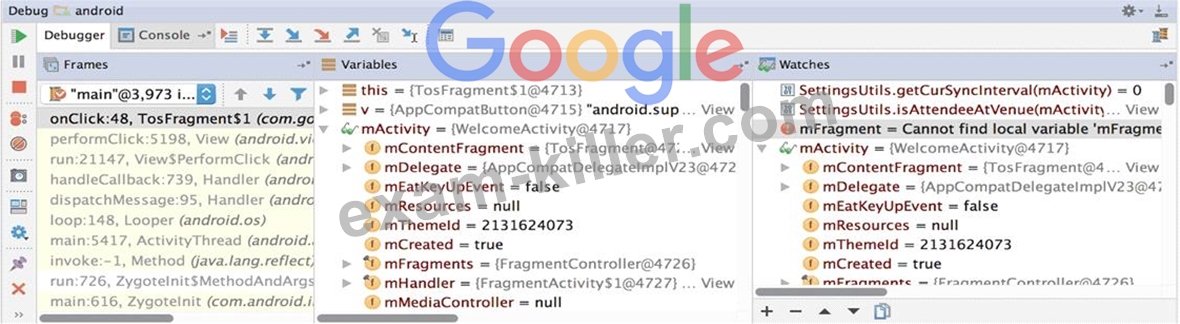
- A. The Breakpoints window lists all the current breakpoints and includes behavior settings for each
- B. The Variables and Watches panes in the Debugger window
- C. Logcat window with filter settings
- D. Adding a watchpoint to a variable in memory
- E. Debugging native code using LLDB
Answer: B
NEW QUESTION 50
In application theme style, flag windowDrawsSystemBarBackgrounds (<item name="android:windowDrawsSystemBarBackgrounds">) indicates:
- A. whether there should be no title on this window.
- B. whether this window should have an Action Bar in place of the usual title bar.
- C. whether this is a floating window.
- D. whether this Window is responsible for drawing the background for the system bars.
- E. that this window should not be displayed at all.
Answer: D
Explanation:
Reference:
https://developer.android.com/guide/topics/ui/look-and-feel/themes https://developer.android.com/reference/android/R.styleable.html
NEW QUESTION 51
Content labels. What attribute to use to indicate that a View should act as a content label for another View?
- A. android:contentDescription
- B. android:labelFor
- C. android:hint
Answer: B
Explanation:
Reference:
https://support.google.com/accessibility/android/answer/7158690?hl=en
NEW QUESTION 52
......
The best Associate-Android-Developer exam study material and preparation tool is here: https://www.exam-killer.com/Associate-Android-Developer-valid-questions.html
